The free fitness challenge app for coaches and creators
Run your challenge in a free app, not in the comments. Each day’s workout shows up on your followers’ phones, the camera counts their reps, and you see exactly who did it.
Request free accessFree for you and everyone who joins · iPhone and Android · No limit on how many
Already have an account? Sign in

How a 30-day pushup challenge runs in the portal
You post a 30-day challenge. Hundreds of people comment “I’m in 🔥”. By Day 4 you have no idea who’s still training, and every “I did 100 pushups” is on the honor system. Here’s the same challenge, run in the free Trainer Portal.
Build each day’s workout
In your browser, make Day 1 three sets of 5 pushups, Day 2 three sets of 6, and keep climbing. Make every 7th day a test: a 2-minute AMRAP, as many pushups as they can. Turn on camera counting for any day you like.

Put one link in your bio the week before
Everyone gets the same invite link. Tapping it opens the app with your code filled in. No app yet? The link shows the App Store and Google Play buttons first.

Close sign-ups, then send all 30 days
The night before Day 1, assign each workout to its date and send it to everyone on your list. One evening of setup covers the whole month.

Day 1 is waiting on their phone
They open the free MyRepsCount app and today’s workout is there. They check off each set as they go. On camera days, they prop up the phone and the camera counts every rep. No honor system.
See what they see →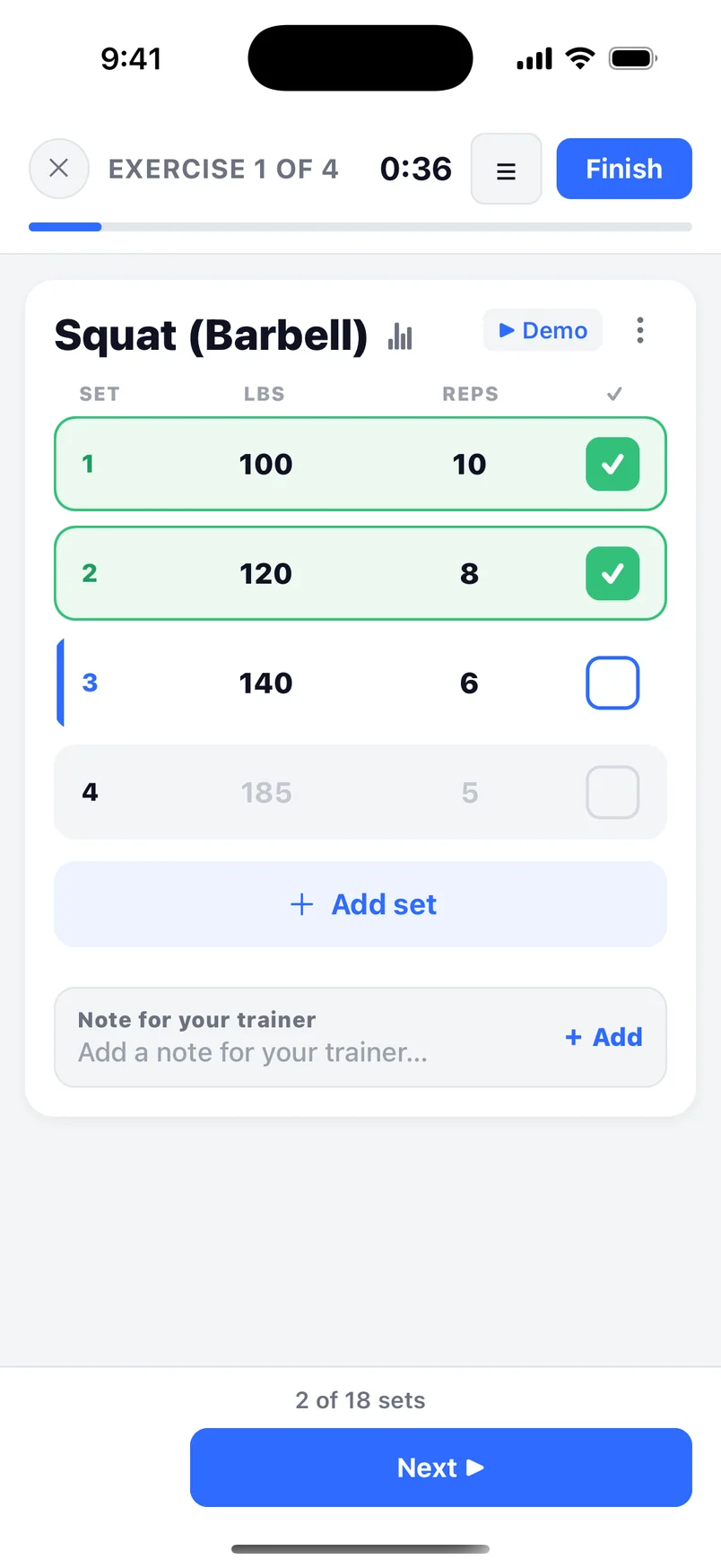
See who trained today, and who scored highest
Each day shows who’s done, who stopped partway and who hasn’t started. Test days come back ranked by the camera’s count. Only you see the ranking, so you choose what to post.

On Day 30, see who showed up
The person who trained 28 of 30 days and rated every workout an 8 is ready for a real plan. Give them their own program in the same portal and keep coaching them one-on-one.

What you get that a comment section can’t give you
-
Real numbers
The phone counts the reps, so a 58 is 58.
-
Who’s actually in
Who trained today, who skipped and who stopped on Day 4.
-
How hard it felt
Everyone rates each workout 0–10, so you know if Day 12 was too much.
-
A post every day
“112 of you finished Day 1.” Every number is content.
-
Clients at the end
Finishers are your warmest leads, and they’re already in your portal.
Use it on your channel
Ideas you can copy for your next challenge.
- “Comment PUSH and I’ll send you the link.” Reply with your invite link by hand or from your DM tool.
- A nightly Story with the number, not the names: “Day 9: 71 of you are done. 40 to go.”
- On Day 30, a Close Friends Story only finishers see: “I’m opening 5 one-on-one spots.”
TikTok
- A “Day X of 30” series: film yourself doing the day’s workout with the phone counting your reps on screen.
- A test-day LIVE at 7pm. Everyone does the 2-minute test together, then you read out the top scores.
- The finale: “Day 1 test average: 19 pushups. Day 30: 31.”
YouTube
- Pin your invite link under a follow-along video, then schedule that workout for the days you want it done.
- Make “my plan in your app, and I check your sets” a channel membership perk. Post the link where only members see it.
- Film the video your data makes: “I gave 100 subscribers the same workout for 30 days.”
Selling a program instead?
Give each buyer their own copy of your 6-week program, change their weights any time, and see every set they log next to the one you planned.
See how one-on-one coaching works →Questions
Is it really free?
Yes, for you and everyone who joins. There’s no limit on how many people join and no paid tier.
Does it work on Android?
Yes. Everyone who joins uses the free MyRepsCount app on iPhone or Android.
Can I charge for my challenge?
Yes. Take payment the way you already do, then send buyers your invite link. MyRepsCount takes no cut. Anyone with your link can join, so send it after they pay.
Do participants see the rankings?
No. Only you see them, and you decide what to post. Ask before you share anyone’s name or handle.
Does everyone have to use the camera?
No. You choose for each workout: the phone’s camera counts their reps, or they log reps themselves.
Which exercises can the camera count?
60+ exercises, including pushups, squats, lunges, sit ups, burpees, jumping jacks, curls and kettlebell swings. There are 300+ exercises for manual logging.
Is there a group chat?
No. Keep your community where it already lives: your comments, your DMs, your Discord. The portal handles the workouts and the numbers.
Why do I need to request access?
We set up every coach personally. Tell us about your challenge and we’ll send your invite code.
Request free access
Tell us where your followers are, roughly how many might join, and what kind of challenge or program you run. We’ll reply with your invite code.
Already have an invite code? Create your trainer account →